
Two fields on the modal · the AU address answered on oshi4.io/en-AU in August 2026 · the digit rotates
Oshi Australia/Login
Get in, or find out why you cannot
Oshi's door is a small modal asking for two things: an email and a password. Most Australians searching this term are stuck a step earlier, on an address that will not load.
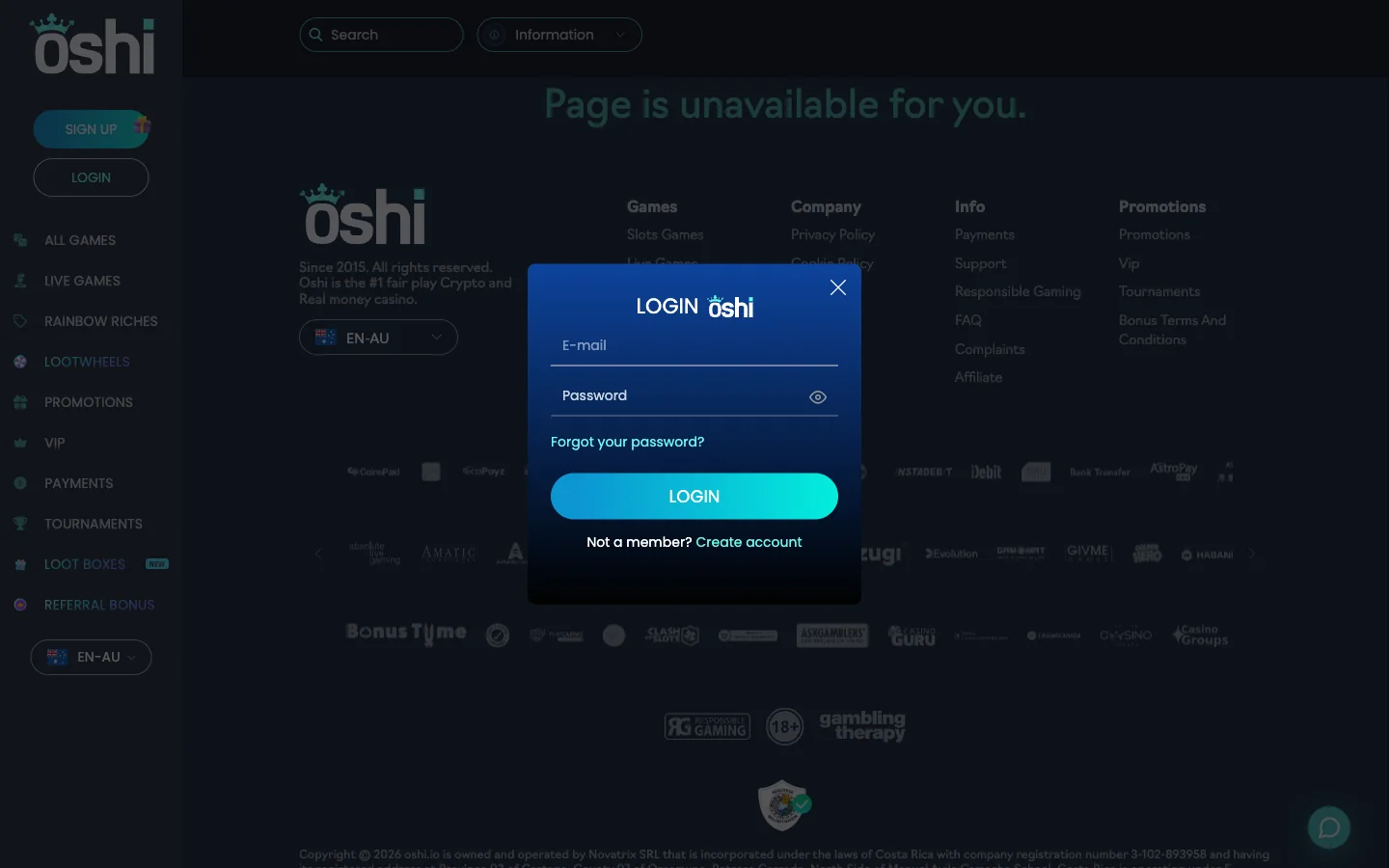
Two inputs, and that is the lot. The top one takes the e-mail you registered with, the second your password, and a small eye flips that box between dots and readable text. Tap the eye before clicking anything — it rescues half of all failed sign-ins.
Three links share the box. Forgot your password? sits below the password input and starts the reset. LOGIN submits. At the bottom, Not a member? Create account swaps in the registration form, which adds a country dropdown, a currency dropdown and two tickboxes — pulled apart on the Oshi registration page.
If the site loads, this takes fifteen seconds.
This is the part the pages ranking for "oshi casino login" leave out, and it is usually the real problem. Oshi has no permanent web address. oshi.io is the root brand; Australian traffic in August 2026 was answered by https://www.oshi4.io/en-AU/. That number changes.
The reason is dull rather than sinister. Oshi is run offshore — Novatrix SRL, Costa Rica, Tobique licence — and offshore casino domains get filtered, blocked and de-indexed here on a regular cycle. Moving to a fresh numbered domain keeps the door open. The digit is a counter, not decoration, and when the site stops answering it has usually moved on without you.
Finding the current one trips people up, because the obvious move — searching the brand and clicking whatever appears — is wrong. Four safer routes:
Now the blunt bit. At least a dozen sites use "oshi" in their domain names, mostly affiliate pages like this one, and a few carry a sign-in box. A page that is not the casino has no reason to want your casino password. Right logo, wrong domain, login form waiting — close it.
Seven symptoms cover nearly everything that goes wrong here.
| Symptom | Likely cause | What to do |
|---|---|---|
| Address will not resolve at all | The mirror number rotated, or your resolver filters the domain | Get the current address from a maintained link or an Oshi email. Switching to mobile data shows whether your network is the culprit. |
| Page loads, LOGIN button does nothing | A blocker is stopping the script that opens the modal, or a stale cached bundle | Allow the domain, hard refresh, then try a private window with extensions switched off. |
| Password rejected although you know it | Caps lock, a stray space from autofill, or a credential saved against an older mirror | Click the eye and read what is in the box, then delete the autofill and type it by hand. |
| "Page is unavailable for you" | A region-locked route, served on some paths rather than across the whole site | Return to the en-AU root and open the modal from the sidebar. It is about the URL, not your account. |
| Verification email never arrives | Junk filtering, a typo at sign-up, or provider delay | Check spam and promotions, then contact support with the address you think you used. A mistyped one never fixes itself. |
| Session drops on mobile data | The carrier hands you a new IP, or the browser evicts the tab | Pin the site to your home screen and stay out of private browsing. |
| Wrong language or currency after sign-in | A redirect landed you on the global root | Set the selector back to EN-AU; the Australian promotions attach to that locale. |
The link sits under the password field: Forgot your password? Click it, give the modal your account email, and a reset message arrives there. Follow the link, set something new, and the old password dies at once.
If nothing lands, the operator's help pages say to contact support where self-service does not sort things out. A broken reset is not the end of the account.
The password matters more here than at some casinos. Oshi's FAQ says it typically does not verify accounts when money is paid in or withdrawn; checks come from suspected fraud instead. Convenient, obviously. It also means nothing stands between whoever holds your credentials and your balance.
Four habits follow from that:
There is no native Oshi app to download. The casino is a browser app, which is why closing the tab or clearing site data logs you straight out.
The fix is a home-screen shortcut. Pinned, the site opens in its own window, keeps its storage, and holds the session far longer than a tab buried behind forty others. It also saves retyping the address. Install steps for Android and iOS sit on the Oshi mobile app page.
Oshi's FAQ names its security setup as 128-bit SSL together with PGP. That is what covers the credentials you type into the modal.
So the document journey, where it happens at all, is short: upload, watch the status change, carry on. None of it touches the login itself.
Who holds those documents is a fair question, and the answer is not what most review sites print. The operator's footer names Novatrix SRL, Costa Rica, company number 3-102-893958, licensed by the Tobique Gaming Commission. Others still list Curaçao and a different company. That disagreement gets proper space on the Oshi review page.
In August 2026 the Australian route answered at https://www.oshi4.io/en-AU/, with oshi.io as the root brand. The numbered mirror rotates, so check it against a maintained link first.
It is a mirror counter. Offshore casino domains get blocked and filtered, so the operator moves to a fresh numbered address. The number rising is normal rather than a warning sign.
Your e-mail and your password, nothing else. The box also carries a show/hide eye, the reset link, the LOGIN button and a link across to the registration form.
That appears on region-locked routes rather than across the site. Return to the en-AU root and open the modal from the sidebar. It reflects the URL requested, not your account.
Click "Forgot your password?" under the password field, enter your account email, and open the reset link Oshi sends. Where that flow fails, the operator says support can pick it up.
No. Only the sign-up email confirmation gates access. Oshi says accounts typically stay unverified even when money moves, with documents requested where fraud is suspected and approved shortly after upload.
Private browsing discards the session on close, and mobile browsers evict background tabs when memory runs short. Pin the site to your home screen so storage survives.
There is no native download in either store. Oshi runs as a browser app, and a home-screen shortcut is the closest thing to an install. Setup sits on the mobile app page.
The button below goes to the Australian address that answered when this page was last checked, so the mirror question is handled for you.
Go to Oshi and sign in